Routing Switchers
Blackmagic Design Compact Videohub | 3G-SDI Routing Matrix with 40 I/O


Product Code:
Product Discontinued
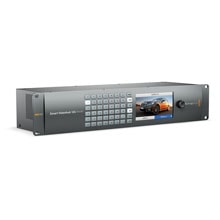
Advanced 12G-SDI router supports all SD, HD and Ultra HD SDI video formats simultaneously
Now you can eliminate complicated manual video patching forever! Compact Videohub lets you connect all the equipment in your facility and easily change connections right from your computer's desktop!
Perfect when you need a bigger router in a small size, such as creative post facilities and broadcast trucks! Compact Videohub includes 40 x 40 SDI routing all packed into a 2 rack unit size! You get auto SD, HD and 3 Gb/s HD-SDI detection, re-clocking, with built in ethernet, USB and serial router control interfaces.
No Manual Patching!
In the past most studios have been forced to use manual patching to connect editing workstations and decks. However this can become too complicated for creative designers, graphic artists and editors to understand, plus it gets even more complicated as your studio grows. Manual patching also caused problems with limited SDI cable lengths, and patch cables quickly wear out, so you get glitches as other users bump them while patching.
Videohub eliminates this problem because everyone is permanently connected, and no cables need to be physically changed ever. All video connections are changed from an easy to use software application right from your computer desktop. Unlike manual patching, Videohub re-clocks the SDI video signal for long cable lengths. Plus unlike manual patching, you can send one SDI video connection to as many outputs as you like, so multiple people can access any SDI video source, all at the same time.
High end post production and broadcasters have understood the advantages of professional routing switchers for decades, and now with Videohub, everyone can afford these same workflow advantages.
Industrial Strength Routing Switcher
Blackmagic Design's Videohub routers are not only based on a revolutionary design but they also have the most advanced electronics technology available today. All Videohub routers include SDI re-clocking so even the longest distance equipment from your router can be connected together. Combined with redundant power supplies, power fail protection and high reliability single PCB construction, Videohub routers are true broadcast quality.
Â
World's Greatest Router Control
If you hate the high cost of router control panels, then you'll love Videohub because we include free software for Mac and Windows computers with incredible icon buttons! Videohub software looks fantastic, and when used on new touch screen all in one computers, you get a fantastic large screen XY control panel!
Videohub Smart Control is a compact 1 rack unit size at less than an inch thick. It uses ethernet for control and even supports power over ethernet! Each button is a bright crystal look RGB illuminated design thats been optimized for high reliability. Videohub Smart Control allows button caps to be removed so labels can be customized!
SDI Re-Clocking
Videohub also includes built in SDI re-clockers on each SDI input which regenerate the SDI video signal. Every inch of video cable from your SDI video devices degrades the SDI signal. Expensive premium grade "digital" cables can help, however simply cannot eliminate this loss. With SDI re-clocking you can have a regenerated and clean SDI signal out to all the SDI devices in your studio. That means longer cable lengths, and no glitches in your video.
Simultaneous SD, HD or 3 Gb/s Video
Videohub makes it easy to run Standard Definition and High Definition equipment now and add 3 Gb/s SDI equipment in the future. That's because Videohub handles mixed SD, HD and 3 Gb/s SDI connections all on the same router at the same time. Videohub automatically detects when an SDI input changes, and instantly sets all SDI outputs connected to that input to match. SDI re-clocking and output SDI slew rates change automatically.
Independent Monitoring
Because most editors love monitoring direct from the router, Videohub has up to 144 independent SDI outputs totally dedicated for monitoring. Independent monitoring outputs are great when you need to quickly look at decks and other editing systems in your facility. You can also use the extra outputs to connect consumer VHS and DVD recorders via external converters.
Deck Control Routing
With up to 144 independent Sonyâ„¢ compatible RS-422 serial control ports included, each editing system can control any deck in your facility. Each deck control connection is independently reversible via software control, so it's easy to connect edit stations or decks to any of the deck control ports.
World's Highest Quality 3 Gb/s SDI
With the exciting new 3 Gb/s SDI connections built in, Videohub allows twice the SDI data rate than normal HD-SDI. Use 3 Gb/s SDI for high resolution real time 2048 x 1556 feature film editing. 3 Gb/s SDI has full compatibility with SD, HD or 2K in 4:4:4 or 4:2:2 all with a single BNC cable. With 3 Gb/s SDI built in, you have full compatibility with all your current standard definition SDI and high definition SDI equipment, plus any new formats that come along in the future. With Videohub, your studio is future proof.
Network Router Control
Videohub connects to any computer via USB and is then shared over your local network. Any computer can be the host by simply connecting to the router via the USB 2.0 connection, which activates that computer as the host and allows other computers on your network to connect. Router labels can be changed from any computer and are fully unicode compatible for foreign language support.
Here's an overview of our vendors exhibiting at ISE 2020. Please call us on +44 (0)1457 851000 if you would like to book a stand tour with one of our manufacturers. BLACKMAGIC DESIGN HALL 3, STAND C140 The Video Assist 12G 5” and 7” monitor recorders are now shipping. The original HD versions were incredibly popular with AV technicians who wanted to verify SDI and HDMI feeds and check waveform levels. For production teams, their 4K HDR capture makes them a superb on-camera SD card recorder. The ATEM Mini is a very small, cost-effective 4 channel HDMI video switcher with streaming output. Great as a portable mixer or a signal switcher, it’s being adopted by everyone from conference producers to AV technicians looking for simple HDMI switching.
Not just some new products and technical updates from Blackmagic Design. No, these are major new products and massive technical updates.
NOTE: Please update your Videohub's firmware after installing this software. The Administrator Utility will advise if this is necessary.
Some applications may use third party code under license. For details please refer to the included "Third Party Licenses.rtf" document.
Download the latest Firmware and Software
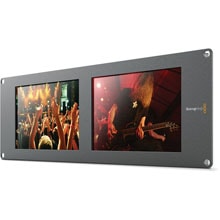
Dual 8-inch SDI LCD rack monitors
[BMDHDLSMTVDUO2]

