Sonnet Qio
Suggested List Price:
£695+VAT
Professional Universal Media Reader/Writer Plus Four eSATA Ports
Multiple Slots, Quick Input and Output
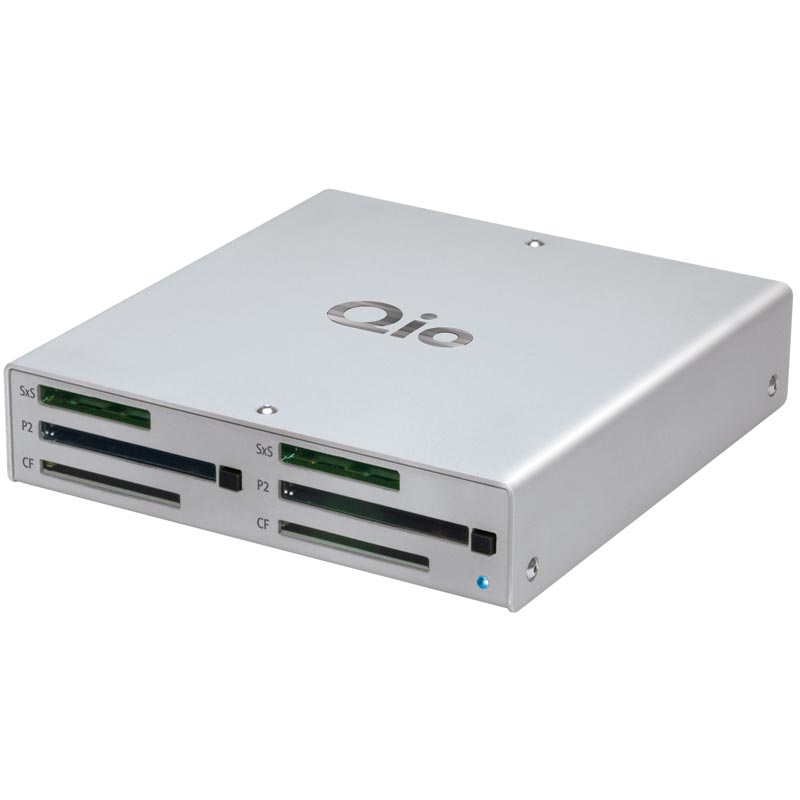
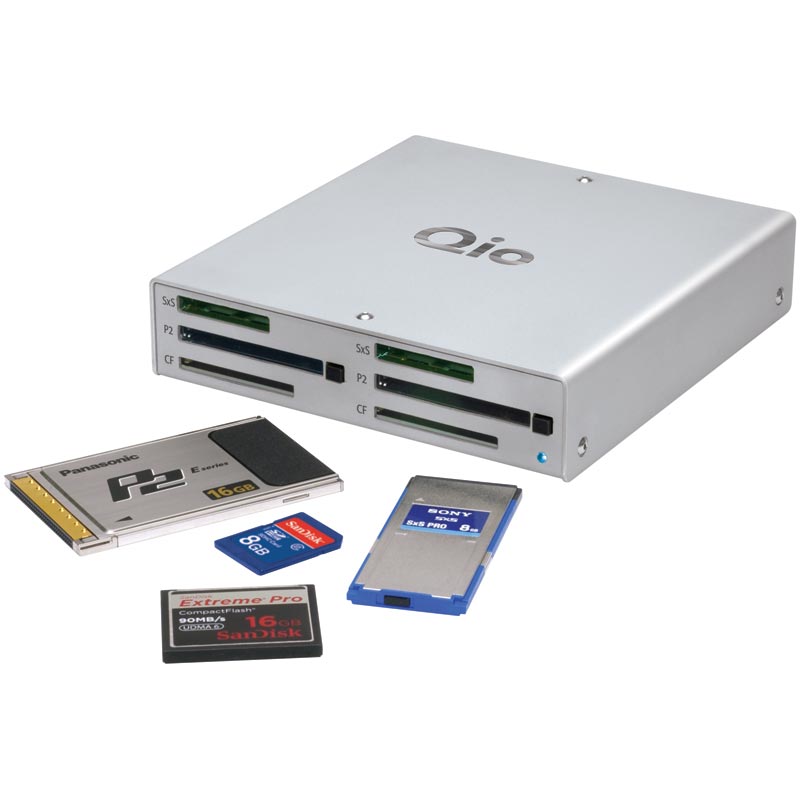
Sonnet's Qio is a multi-tasking marvel. Qio reads from and writes to just about any memory card-P2, SxS, CompactFlash, SD, XD and more-at high speed. Dual P2, SxS, and CF slots enable you to offload files more efficiently, and the included Sonnet 21-in-1 Multimedia Memory Card adapter handles the remaining memory cards.
E4P SATA Host Controller Inside
Qio contains heart and circuitry of the acclaimed Sonnet Tempo SATA E4P SATA controller card. Four eSATA connectors on the back of Qio enable you to connect two Sonnet Fusion F2 portable 2-drive RAID SATA storage systems to easily copy files between them. Qio's support of SATA port multipliers enables you to connect four drive enclosures like Sonnet's Fusion D500P with access up to 20 drives!
ExpressCard/34
Qio's SxS slots double as ExpressCard/34 slots and the P2 slots are compatible with CardBus cards. If you're a notebook user, this effectively quadruples the number of expansion card slots available to you. If you're a desktop computer user, Qio enables you to swap adapter cards without cracking open the case. How is this possible? Qio connects to an included interface card that extends the PCIe bus outside your computer, and when used with a notebook, the USB bus is extended through the ExpressCard slot, too. Qio is available with either a PCIe adapter card for desktops or an ExpressCard/34 adapter for notebooks. Additional interface cards are available separately.
Travel and Desktop Companion
Qio is small-about the size of three stacked CD cases-and takes up so little space, you can use it just about anywhere. It's rugged, too-with a robust aluminum case. No matter where you use it, Qio will quickly become an essential tool.
Sonnet Qio
Suggested List Price:
£695+VAT
Professional Universal Media Reader/Writer Plus Four eSATA Ports
- Comprehensive Media Compatibility - Supports Sony SxS, Panasonic P2, CompactFlash, and 21 additional memory card types (with included adapter)
- Fast - Uses PCI Express bus interface to deliver superior performance
- Mac and Windows Compatible - Qio works with in your workflow, regardless the platform you've chosen
- Built-In SATA Connections - Fast SATA host controller based on Tempo SATA E4P with four eSATA ports; supports up to 20 drives
- Small and Rugged - Strong aluminum shell measures just 5.9" x 6.2" x 1.22"
- Ships with either Sonnet Express Bus Extender PCIe or Sonnet Express Bus Extender ExpressCard/34 interface card
- Package includes Qio, PCIe or ExpressCard/34 interface adapter, interface cable, Sonnet 21-in-1 memory card reader & writer, power supply, carrying case
- Qio Review for EventDV Magazine
Sonnet Qio
Suggested List Price:
£695+VAT
Professional Universal Media Reader/Writer Plus Four eSATA Ports
| Frequently Asked Questions |
| Q: |
Why does my Macintosh take so long to boot when the Qio is attached? |
| A: |
It is normal for the Macintosh to take a long time to boot (as long as 10 minutes) the first time after a Qio is attached. All the new drivers need to be discovered and the kernal caches built. It is important to let this initialization process complete without interruption.
However, in some instances, the Mac takes a long time for subsequent boots as well. If this occurs, run the Qio System Uninstaller and rerun the Qio System Installer. This should clear the problem. |
| Q: |
Can I use the AJA IO Express with the Sonnet Qio in a MacBook Pro? |
| A: |
Yes. Just plug the AJA ExpressCard/34 adapter into one of the Qio's two ExpressCard/34 slots. |
| Q: |
Is the Qio driver compatible with a 64-bit kernel boot of OS X 10.6? |
| A: |
Not at this time. |
| Q: |
Under OS X 10.6.2 (but not 10.5.8), the top right menu items may disappear when using Qio in a MacBook Pro. We believe this is a bug in Apple's ExpressCard.menu program under 10.6.2, and have reported this to Apple. To move the offending file out of its harming location to a safe place in your documents folder: |
| A: |
1) Launch the Terminal app that you will find in your Utilities folder.
2) type the following command
sudo mv "/System/Library/CoreServices/Menu Extras/ExpressCard.menu" ~/Documents
The ExpressCard menu item will no longer appear, but all the other menu items will. When Apple fixes ExpressCard.menu with a software update, the ExpressCard menu item will automatically return. |
| Q: |
Can I power the Qio with the F2 FW power cable to the FW port on a MacBook Pro? |
| A: |
This powering method is not officially supported because the Qio can require more power than one FireWire port's power specification. However, the single FireWire port on the unibody MacBook Pro seems to be capable of providing more power (up to 20W in our test) than its specification. In Sonnet tests under the following conditions:
1) If Qio is used with only memory cards (SxS's or SDHC, but not ExpressCard/34 controller cards; P2 cards but not CardBus controller cards; and/or CF Cards);
2) Qio has no drive or only one Fusion F2 attached (but not any other bus-powered drive with a bridge controller board); and
3) MacBook Pro is unibody model;
then the Qio plus one Fusion F2 seems to be able to be bus powered from the unibody MacBook Pro FireWire port. You would need to use the FireWire power cable provided with the Fusion F2. Sonnet does not guarantee or support this configuration.
This does not seem to work in MacBook Pros previous to the unibody |
| Q: |
What kind of battery can I use with the Qio? |
| A: |
A battery should be capable of providing 12Volts @ 3 Amps and have an XLR 4-pin power connector. Nominal power usage of Qio is 9W, and attached F2s are 8 Watts each. An example of a compatible battery is the Bescor MM7XLR-NC (BC-500 charger sold separately) that can provide 12Volts @ 7.2Amps and has a 50 Watt-hour capacity. This battery could power a Qio for 5.5 hours, or a Qio plus F2 for 3 hours. |
| |
Sonnet Qio
Suggested List Price:
£695+VAT
Professional Universal Media Reader/Writer Plus Four eSATA Ports
CVP London
Tel: 020 8380 7400
E-Mail: Web:
Visual Impact
Tel: 0117 939 3333
E-Mail: Web:
Sonnet Qio
Suggested List Price:
£695+VAT
Professional Universal Media Reader/Writer Plus Four eSATA Ports
Sonnet Qio
Suggested List Price:
£695+VAT
Professional Universal Media Reader/Writer Plus Four eSATA Ports
Special Offer
Offer Ends: 1st January 1970
Latest Software and Firmware
Click here for the latest Firmware and Software
Sonnet Qio
Suggested List Price: £ 695+VAT
Professional Universal Media Reader/Writer Plus Four eSATA Ports
Features:
- Comprehensive Media Compatibility - Supports Sony SxS, Panasonic P2, CompactFlash, and 21 additional memory card types (with included adapter)
- Fast - Uses PCI Express bus interface to deliver superior performance
- Mac and Windows Compatible - Qio works with in your workflow, regardless the platform you've chosen
- Built-In SATA Connections - Fast SATA host controller based on Tempo SATA E4P with four eSATA ports; supports up to 20 drives
- Small and Rugged - Strong aluminum shell measures just 5.9" x 6.2" x 1.22"
- Ships with either Sonnet Express Bus Extender PCIe or Sonnet Express Bus Extender ExpressCard/34 interface card
- Package includes Qio, PCIe or ExpressCard/34 interface adapter, interface cable, Sonnet 21-in-1 memory card reader & writer, power supply, carrying case
- Qio Review for EventDV Magazine
Multiple Slots, Quick Input and Output
Sonnet's Qio is a multi-tasking marvel. Qio reads from and writes to just about any memory card-P2, SxS, CompactFlash, SD, XD and more-at high speed. Dual P2, SxS, and CF slots enable you to offload files more efficiently, and the included Sonnet 21-in-1 Multimedia Memory Card adapter handles the remaining memory cards.
E4P SATA Host Controller Inside
Qio contains heart and circuitry of the acclaimed Sonnet Tempo SATA E4P SATA controller card. Four eSATA connectors on the back of Qio enable you to connect two Sonnet Fusion F2 portable 2-drive RAID SATA storage systems to easily copy files between them. Qio's support of SATA port multipliers enables you to connect four drive enclosures like Sonnet's Fusion D500P with access up to 20 drives!
ExpressCard/34
Qio's SxS slots double as ExpressCard/34 slots and the P2 slots are compatible with CardBus cards. If you're a notebook user, this effectively quadruples the number of expansion card slots available to you. If you're a desktop computer user, Qio enables you to swap adapter cards without cracking open the case. How is this possible? Qio connects to an included interface card that extends the PCIe bus outside your computer, and when used with a notebook, the USB bus is extended through the ExpressCard slot, too. Qio is available with either a PCIe adapter card for desktops or an ExpressCard/34 adapter for notebooks. Additional interface cards are available separately.
Travel and Desktop Companion
Qio is small-about the size of three stacked CD cases-and takes up so little space, you can use it just about anywhere. It's rugged, too-with a robust aluminum case. No matter where you use it, Qio will quickly become an essential tool.